
Trade
Trade Market
Section titled “Trade Market”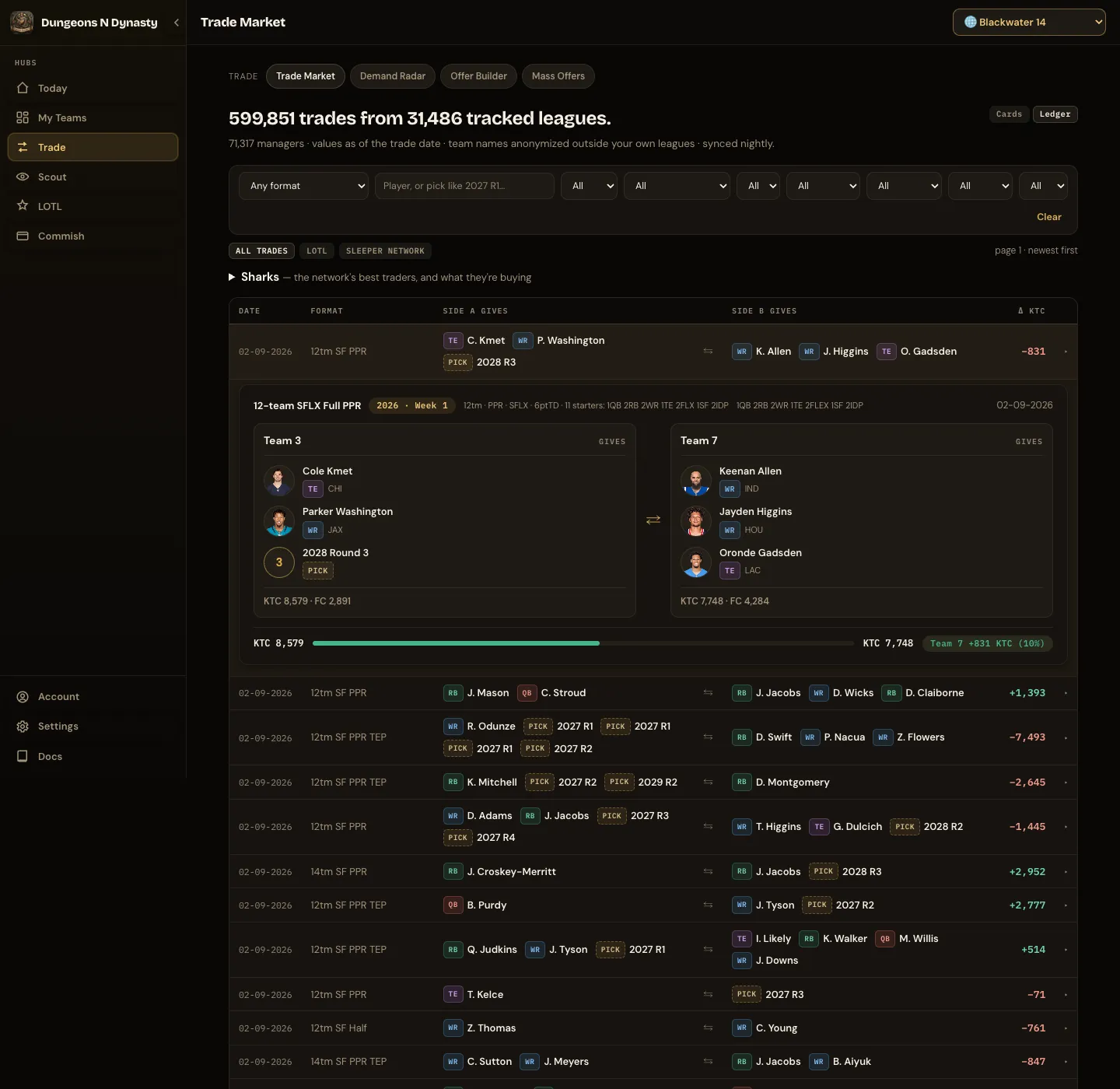
Every completed trade from thousands of tracked Sleeper dynasty leagues, updated several nights a week. Use it to see what a player or pick actually goes for before you make or answer an offer.
Filters. Search a player or a rookie pick (type it like “2027 R1”), then narrow by season, source, league size, scoring, QB format, TE premium and pass-TD points. Match my league narrows everything to leagues that share one of your leagues’ settings and, by default, its starting lineup. Switch Match how to format only if that is too narrow. Clear resets everything.
Reading results. The ledger lists one trade per row: date, format, what each side gave and which side came out ahead. Click a row for the full card, or switch to Cards to browse them with player photos, picks, FAAB and a fairness meter. Trades from your own leagues carry a YOUR LEAGUE chip. Leagues and managers outside your own are never named.
Saved searches
Section titled “Saved searches”Set the filters you care about, a player or pick, a season, a format, or Match my league, and press Save search. The search appears as a chip above the results with a count of trades that have arrived since you last opened it. Tap the chip to run it and the count resets. Remove on a chip deletes that search after a confirmation; Clear only resets the filters on screen and leaves saved searches alone. The Trade Market entry in the menu shows the total across your saved searches, and Today mentions it when there is something new. Up to ten searches per account.
Sharks
Section titled “Sharks”The Sharks tables rank the network’s best traders, separately for players and for rookie picks. Only managers with a proven winning record appear, and always anonymously. The cards below show what they have been buying and selling over the last 15 days, or 30 or 45 if you widen the window. Follow what they do, not who they are.
Demand Radar
Section titled “Demand Radar”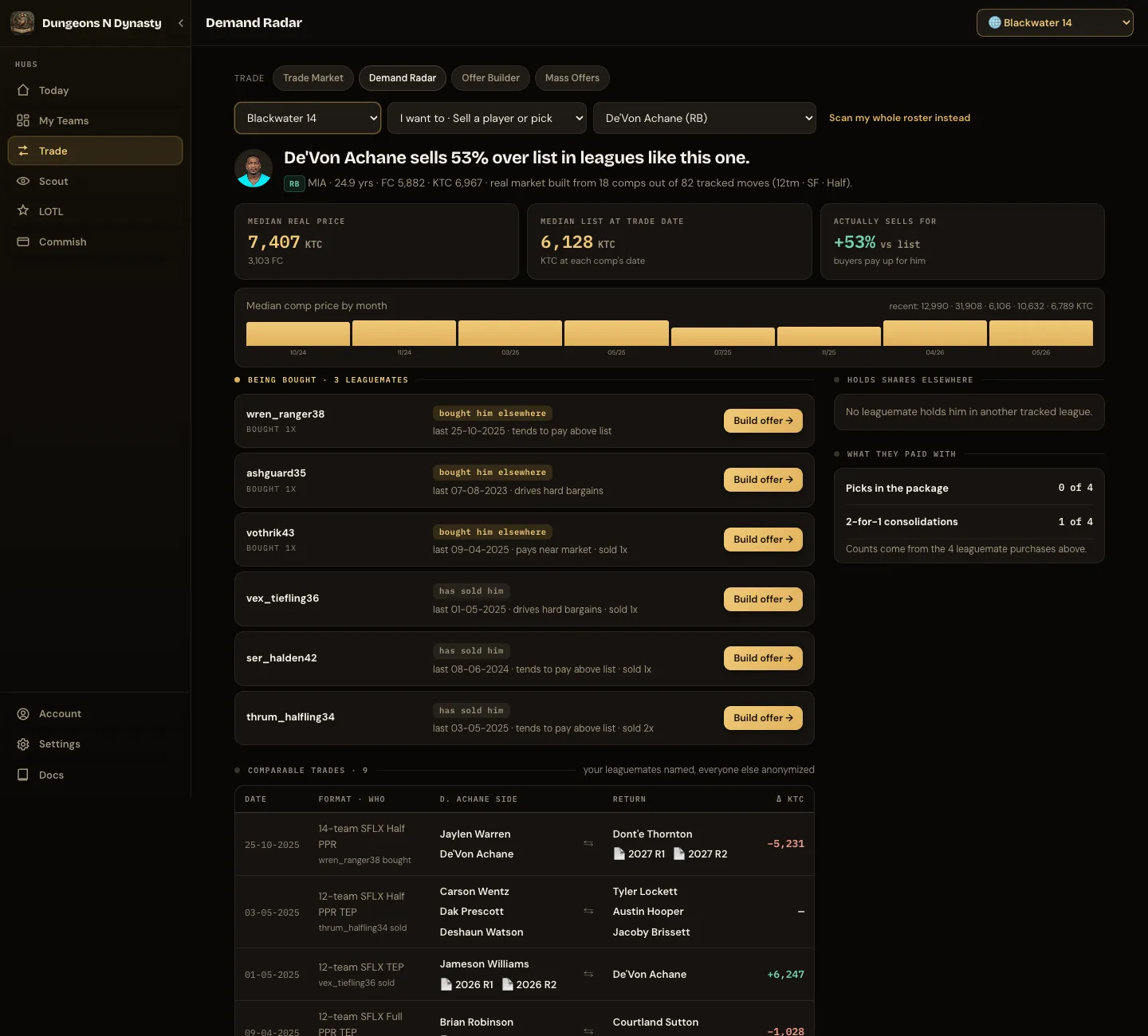
Demand Radar shows how a player has recently been valued in leagues like yours, and which of your leaguemates might want him. Pick a league, choose whether you are selling or buying, and select the player or pick.
The headline says how he actually sells compared with his list price. Below it: the typical completed-trade price, the list price at the time of those trades, and the difference between the two, with a month-by-month trend.
Being bought lists potential trade partners based on recent trade history: leaguemates who have traded for him in their other leagues, and how they have tended to pay. Build offer opens the Trade Calculator’s Find a partner with him already placed. Comparable trades lists the completed deals themselves, with the player always shown first on his side. Your leaguemates are named; everyone else stays anonymous. Scan my whole roster flips the question: which of your players have your leaguemates been trading for elsewhere.
Trade Calculator
Section titled “Trade Calculator”One tool with three modes: Price a deal, Find a partner and Game plan. Pick a league and the format, TE premium and both rosters follow. Values start as dynasty and superflex every time; switch to 1QB or redraft when you need them. Every offer can be sent to Sleeper from here after you confirm.
Redraft leagues. Sleeper tells the calculator what kind of league it is, so a redraft league switches to redraft values on its own. Picks disappear from rosters, search and suggestions, the asks narrow to a position, a balanced return, one better player for two or a specific player, and fit is about this season’s lineup only: no age, no rebuilding, no trade-history signals, since those come from dynasty leagues. Game plan offers only Push all in and Add depth.
Tuned to your league. Published values assume a 12-team league with a standard lineup. When you pick a league, the calculator adjusts each position for that league’s size and starting slots: quarterbacks are worth more in a 14- or 16-team superflex league where two starters are hard to find, receivers more in a three-receiver lineup, running backs more when two must start with the flex spots leaning their way. A line under the controls says when this is in effect. Next year’s rookie picks are priced as early, mid or late by where the original team currently stands; picks further out, and picks in deals loaded from the Trade Market, count as mid-round.
Price a deal
Section titled “Price a deal”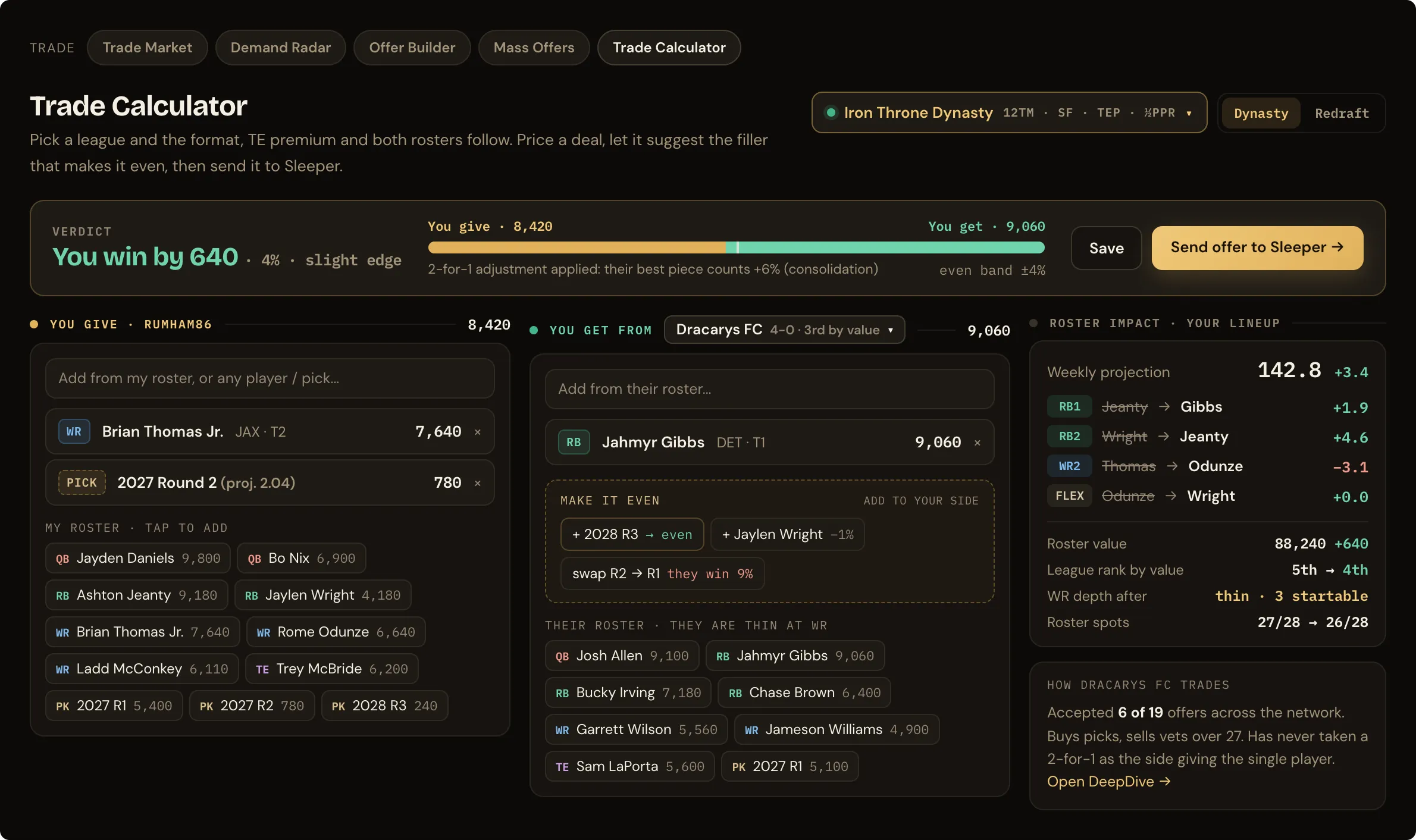
The verdict sits at the top: who wins and by how much, with an even band of a few percent. In a 2-for-1 the single best piece counts a little extra, and the bar says so.
You give and You get each have a search box and the roster to tap from, players in one column by value and picks in another with the soonest first; the partner is a dropdown of your leaguemates. When a deal is lopsided, Make it even suggests the smallest pieces from the losing side’s roster that bring it back into balance. Roster impact re-runs your lineup for the week with the deal applied: projected points, which slots change and by how much, roster value and league rank before and after, and whether a position goes thin. A card beneath it says how the partner trades, and Playoff odds for both teams replays the rest of the season with the deal on both rosters, so you can see what it does to their chances as well as yours. Send offer to Sleeper creates a normal offer after you confirm; Save keeps the deal on this device.
Find a partner
Section titled “Find a partner”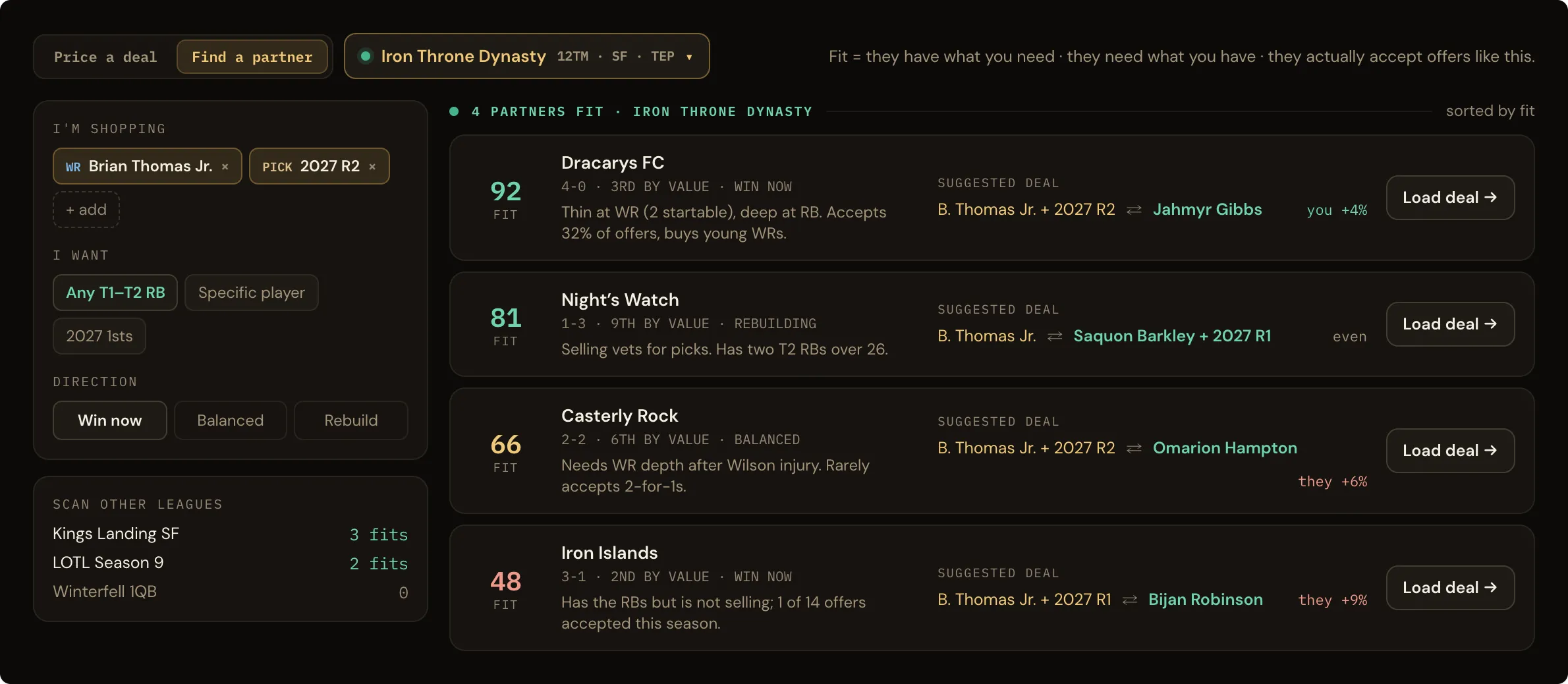
Say what you are shopping and what you want back, and every leaguemate is scored for fit: whether they want what you offer (a thin position, and a veteran only if they are competing now), whether they own what you ask for and tend to move it (a rebuilding team keeps its firsts), and whether they actually trade. Each row names the reasons for and against, and a suggested deal you can load in one tap. The suggestion is built to be even: if their piece costs more than what you are shopping, the smallest pieces from your roster that close the gap are added, and if nothing can make it even the row says so.
What you can ask for: a balanced return, a player at a position (choose the position; the return is built around their players at that spot priced near what you offer), youth and picks, proven vets, several depth pieces, next year’s firsts, one better player when you are shopping two pieces, or a specific player (search any player or pick on another roster; only his manager can deal, and the package is built from your roster). Suggested packages never dip either roster below the starters its lineup needs, and the most valuable players are marked elite and priced above list, because that is what it takes to move them. A line above the list says which kind of team your deal suits. Scan other leagues counts fits in each of your other leagues.
Game plan
Section titled “Game plan”Choose a direction and the calculator proposes several complete offers for your team, each with a partner, both sides and the reasons in plain language. Four directions: Push all in turns bench youth and picks into starters who score now. Add depth fills your thin positions, at one position if you choose. Flip to competing finds similarly valued trades that add the most projected points this season. Start rebuilding turns veterans into youth and picks. The default follows your team’s own shape in that league. Plans are kept for the week; Refresh rebuilds them. Send offer sends one as it is, Edit in Price a deal opens it piece by piece, and Edit in Mass Offers sends a version to the whole league.
Getting there from elsewhere
Section titled “Getting there from elsewhere”Any player sheet has a Trade Calculator button. In the Trade Market, any expanded two-team trade has Price this trade at today’s values, which loads both sides. Each leaguemate row in Demand Radar has Build offer, which opens Find a partner with the player placed, and Price it, which opens Price a deal with that manager on the other side. League HQ’s Best move here, Pick Odds’ Buy window and a manager’s shared leagues in DeepDive open a game plan for that league.
Mass Offers
Section titled “Mass Offers”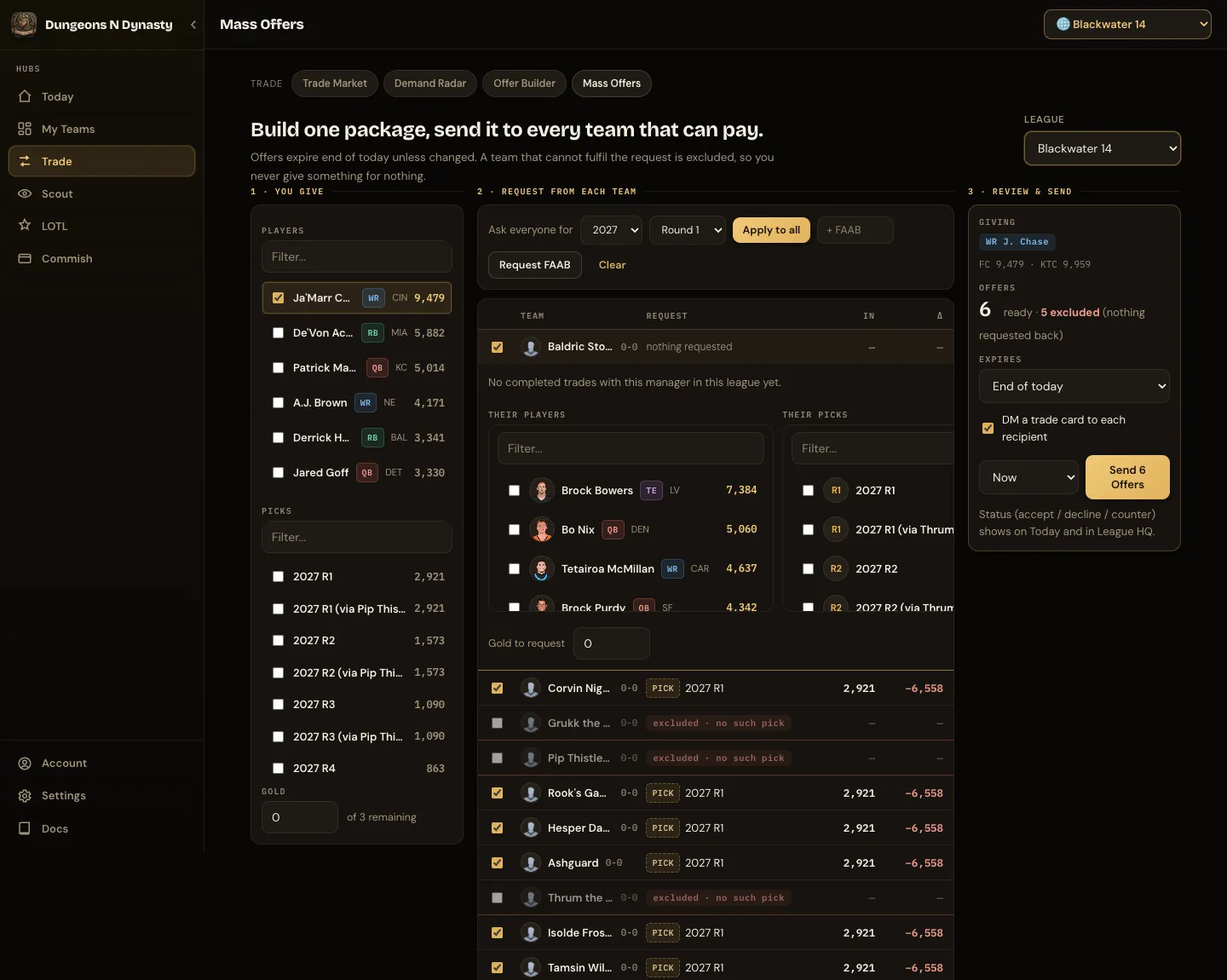
Send the same offer to every team that can pay. Choose what you give, then what you want back from each team: the same pick or FAAB from everyone with Apply to all, or a different ask per team. Teams that cannot fulfil the request are left out, with the reason shown. Review the count and send.
Offers expire at the end of the day unless you change it, and can be scheduled to arrive later so they land when your league is awake. They show up in Sleeper like any other offer. Step by step: Send offers to the whole league.