
Scout
Manager DeepDive
Section titled “Manager DeepDive”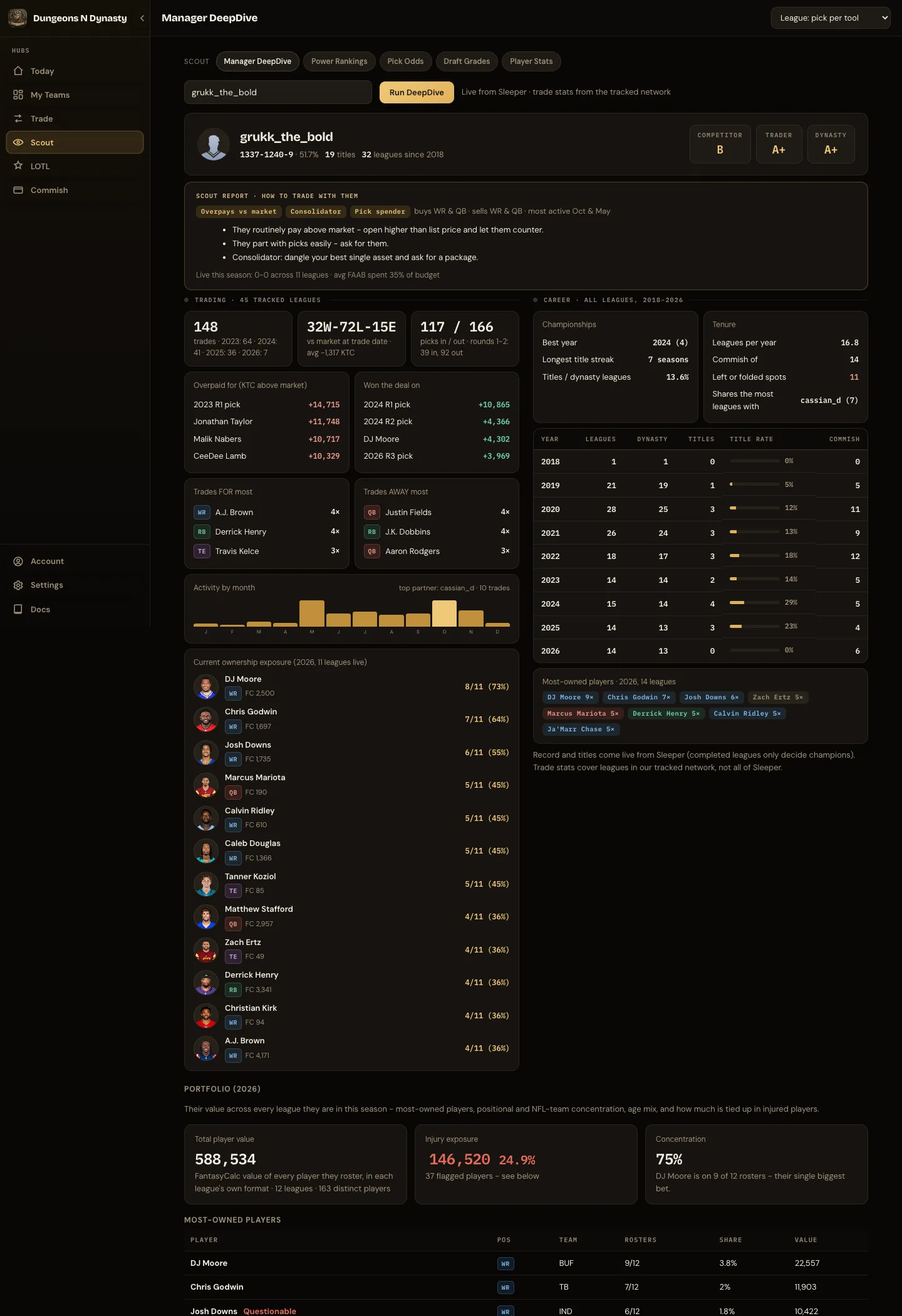
Enter any Sleeper username to see how that manager plays and how to trade with them. Career record, championships, streaks and leagues per year come from Sleeper’s public records. Their trading comes from the tracked Sleeper leagues: how much they trade, whether they tend to pay above or below market, the positions and picks they go after, their frequent partners, their completed trades and their current portfolio across leagues. The scout report at the top turns all of it into practical advice for your next offer.
The first look at a manager who plays in many leagues takes a moment.
Power Rankings
Section titled “Power Rankings”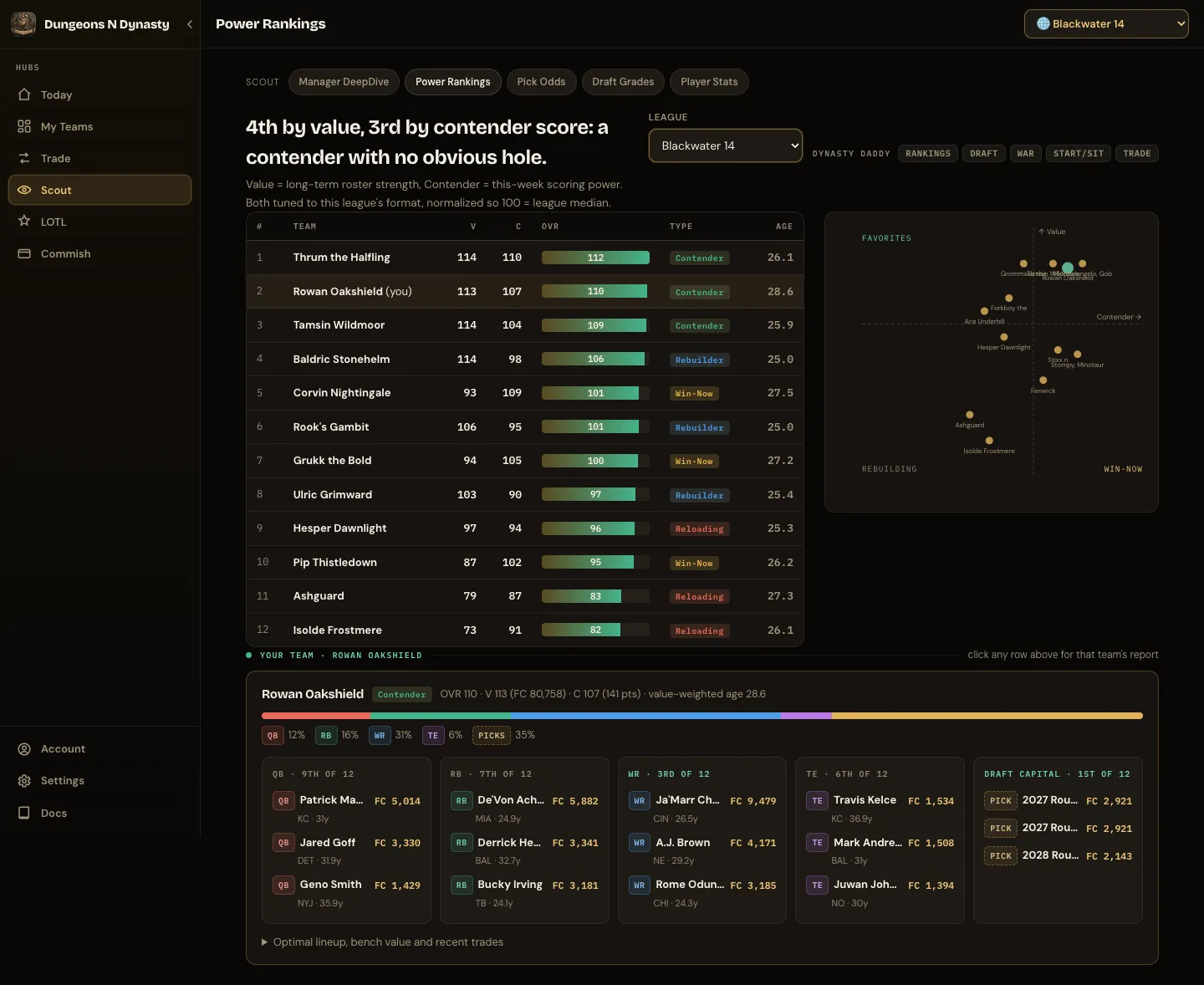
Two estimated scores per team, in your league’s exact format, compared with the league average (100 is average). Value is long-term roster strength. Contender is this week’s scoring power. The chart plots one against the other, so contenders, rebuilders and teams caught in between stand apart. Your own report opens first: value by position, position ranks and draft capital. Click any team for theirs.
Pick Odds
Section titled “Pick Odds”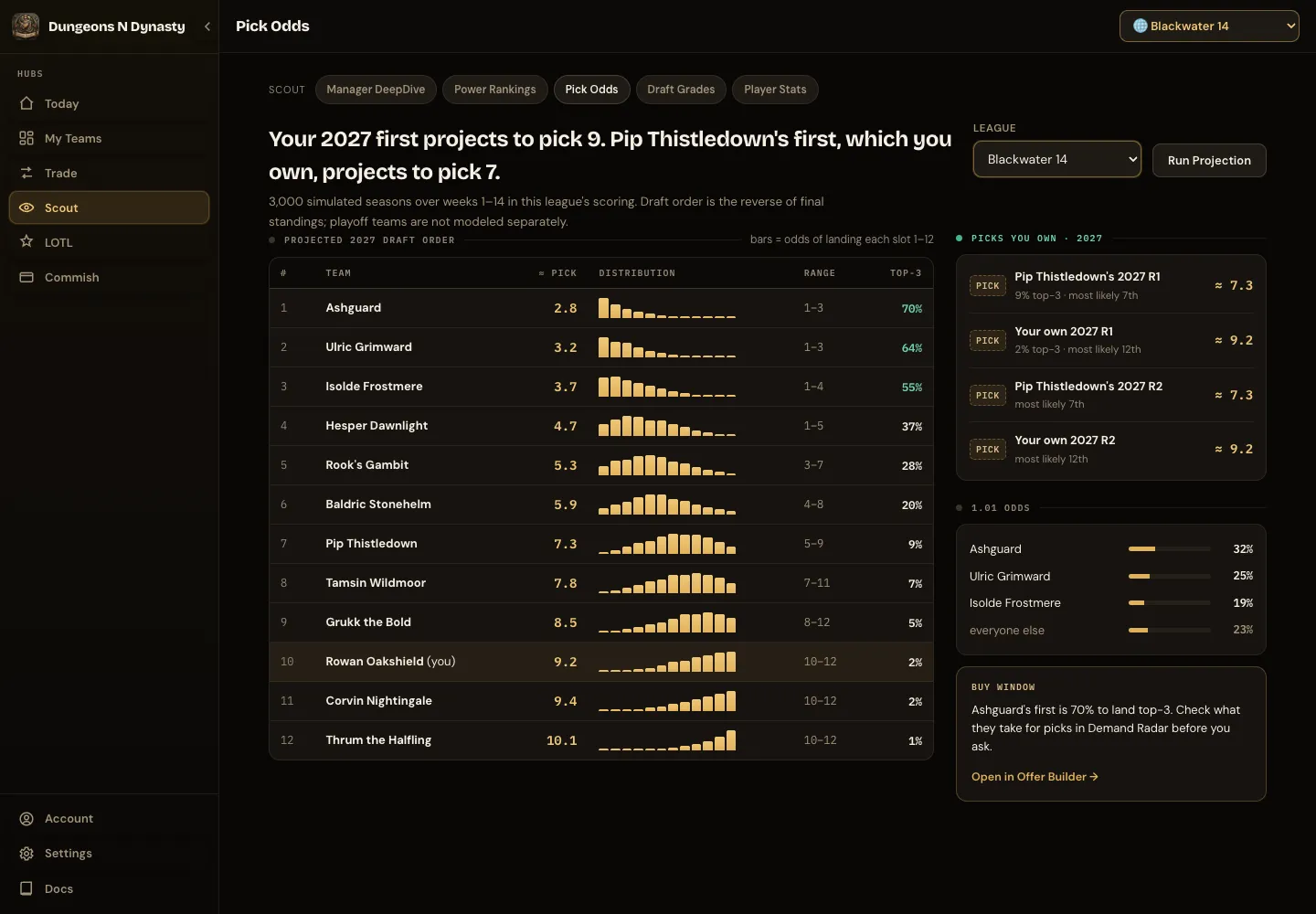
Pick Odds estimates where each pick may land based on the current season. Run Projection plays out the rest of the season many times in your league’s scoring and lists every team by expected pick, with the likely range and the chance of a top-3 pick. Beside it: the picks you own and their projected slots, who is most likely to land the 1.01, and a Buy window naming an available pick with a strong chance of landing early, with a jump into the Trade Calculator’s game plan.
These are projections based on current league data, not guaranteed draft positions. Draft order is assumed to be the reverse of the final standings.
Draft Grades
Section titled “Draft Grades”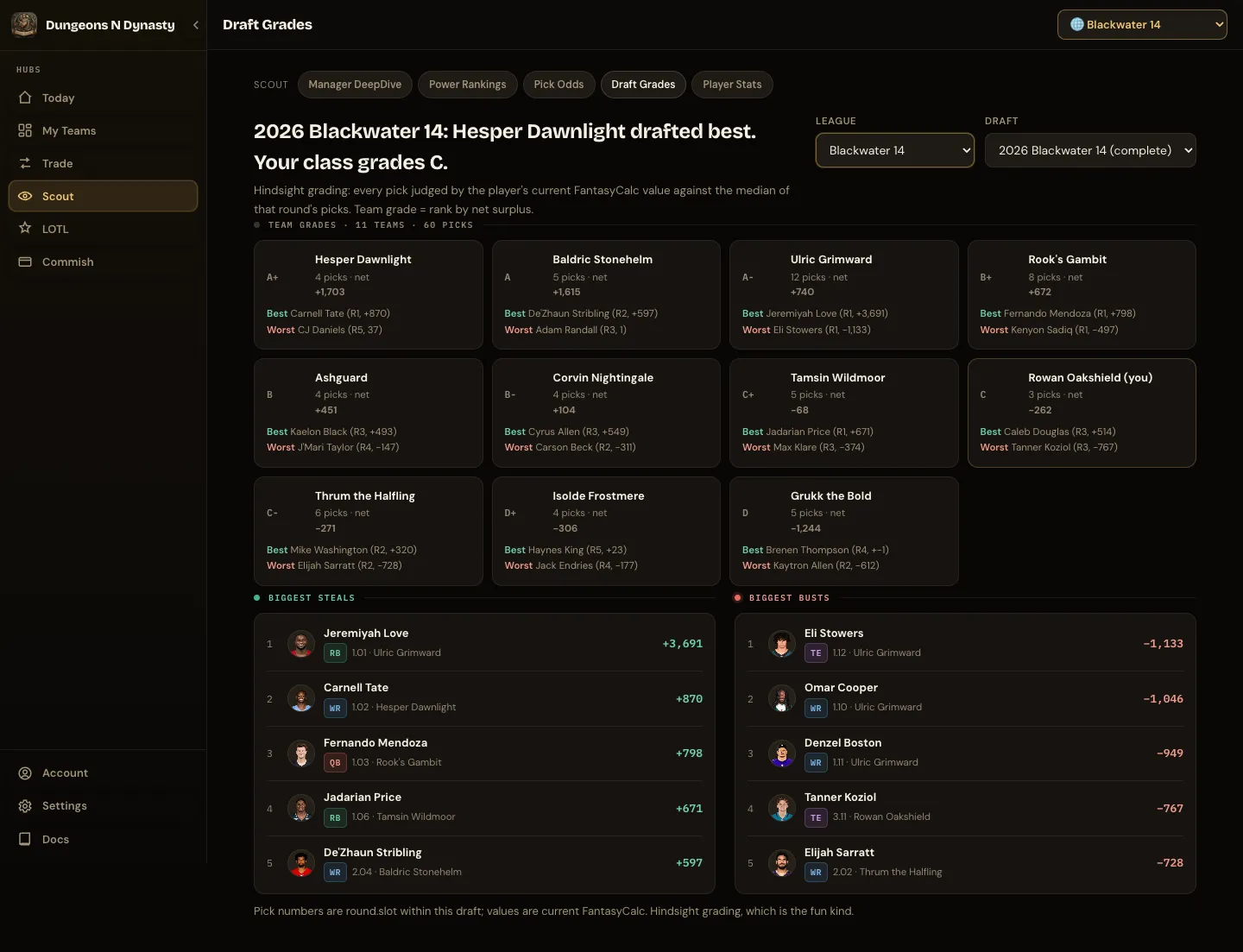
Pick a league and a past draft. The headline names who drafted best and how your class grades. Every pick is judged by what the player is worth today against the other picks of that round, so you see who actually hit. Grade cards show each team’s letter grade, how much value its picks gained or lost, and its best and worst pick, with your card outlined. Below, the biggest steals and busts of the whole draft.
Rankings & Tiers
Section titled “Rankings & Tiers”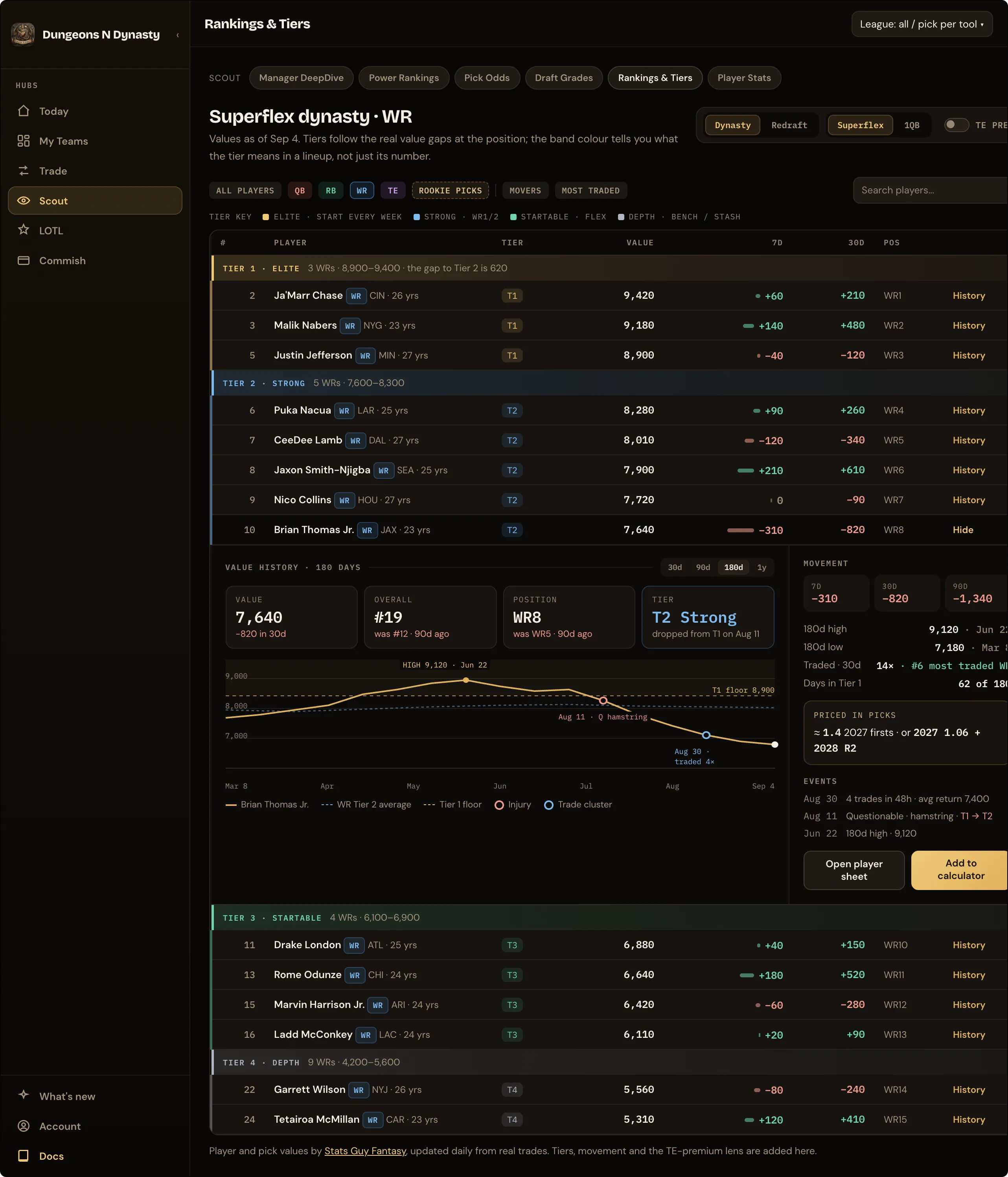
Player values, position tiers and rookie pick values for the league you are working in: superflex or 1QB, dynasty or redraft. Pick the format, then a position to see it in tiers, or Rookie picks for this year’s picks by slot and future picks by round. Search finds any player. History on a row shows how his value has moved day by day.
Table or Board. The switch at the right of the format controls picks the layout. Table lists every player under a colored tier band. Board shows one column per tier, elite to depth, with each column’s value range at the top and the drop to the next tier at the bottom; tap a card and the history opens beside the board. Both use the same filters, search and format, and the app remembers which you chose.
Picks in view. In dynasty, rookie picks sit among the players at their value, so you can see which tier the 1.01 belongs to and which players a future first is worth. All players shows rounds one and two; a position view shows the first round. Next year’s picks are shown as early, mid and late, since where a pick lands changes what it is worth. Turn the picks off with the chip beside the search box.
TE premium re-prices tight ends the way they actually sell in tracked TE-premium leagues, so a TE-premium manager sees a board that matches their market.
My players shows only the players on your rosters, across every league with a count or for the one league you pick at the top; on the full board your players carry a “mine” tag. Tier colors say what a tier means in a lineup: gold Elite (start every week), blue Strong (a WR1/2, RB1/2, QB1 or TE1), green Startable (flex), grey Depth (bench or stash). Each tier band shows its value range and the gap down to the next tier.
History opens a full panel for a player: his value each day with the Tier 1 floor and his tier’s average drawn on the chart, marked highs, tier changes, days he was traded a lot and any current injury; tiles for value, overall and position rank now against 90 days ago, and his tier; movement over 7, 30 and 90 days; how often he has been traded in the last 30 days and where that ranks at his position; what he is worth in picks; and buttons to open his player card or add him to the Trade Calculator.
Two more views sit beside the positions. Movers lists the biggest risers and fallers over the last 15, 30, 60 or 90 days. Most traded shows which players change hands most often across every league Stats Guy Fantasy tracks, with their current value and movement beside the count. The Trade Calculator prices any two sides with the same values.
Values come from Stats Guy Fantasy, derived from real trades and updated daily. The tiers, the 7- and 30-day movement and the TE-premium lens are added here.
Player Stats
Section titled “Player Stats”Weekly stat views for RB, WR, QB and TE in Half PPR, Full PPR or Standard:
- Spike Weeks: how often a player posts a week that wins you a matchup.
- Points Above Replacement: how much more he produces than a freely available player at his position.
- Utilization: snaps, targets and touches, the usage that projections alone miss.
Fills automatically from week 1 of the current season.